We can use the following method in PostgreSQL to return the first day of a given month.
This could be the first day of the current month, or the first day of the month based on a date that we specify.
Getting the first day of the month allows us to perform further calculations on the resulting date, like adding a certain number of days to the start of the month, etc.
Here’s an example that returns the first day of the current month:
SELECT date_trunc('month', now());Result:
2022-04-01 00:00:00+10
This uses PostgreSQL’s date_trunc() function to return the results we want. This function truncates a date/time value to a specified precision.
In this case I use the now() function to return the current date, and the 'month' argument modifies that date to the beginning of the month.
We can cast it to a date value if required:
SELECT date_trunc('month', now())::date;Result:
2022-04-01
Here it is again, along with the actual date that I ran the example:
SELECT
now()::date AS "Current Date",
date_trunc('month', now())::date AS "Start of Month";Result:
+--------------+----------------+ | Current Date | Start of Month | +--------------+----------------+ | 2022-04-09 | 2022-04-01 | +--------------+----------------+
It doesn’t have to be the start of the current month. We can specify any date, and it will return the start of the month, based on that date.
Example:
SELECT date_trunc('month', date '2030-07-14')::date;Result:
2030-07-01
We can then use the result to perform other actions on it. For example, we can add a given number of days to the result like this:
SELECT date_trunc('month', date '2030-07-14')::date + 20;Result:
2030-07-21
Here’s an example that uses dates from a database:
SELECT
rental_date,
date_trunc('month', rental_date)::date AS "The 1st of the Month",
date_trunc('month', rental_date)::date + 19 AS "The 20th of the Month"
FROM rental WHERE customer_id = 459 LIMIT 10;Result:
+---------------------+----------------------+-----------------------+ | rental_date | The 1st of the Month | The 20th of the Month | +---------------------+----------------------+-----------------------+ | 2005-05-24 22:54:33 | 2005-05-01 | 2005-05-20 | | 2005-06-17 02:50:51 | 2005-06-01 | 2005-06-20 | | 2005-06-17 09:38:22 | 2005-06-01 | 2005-06-20 | | 2005-06-17 16:40:33 | 2005-06-01 | 2005-06-20 | | 2005-06-20 02:39:21 | 2005-06-01 | 2005-06-20 | | 2005-06-20 12:35:44 | 2005-06-01 | 2005-06-20 | | 2005-06-20 12:42:00 | 2005-06-01 | 2005-06-20 | | 2005-06-21 02:39:44 | 2005-06-01 | 2005-06-20 | | 2005-07-06 00:22:29 | 2005-07-01 | 2005-07-20 | | 2005-07-08 02:51:23 | 2005-07-01 | 2005-07-20 | +---------------------+----------------------+-----------------------+
Sumber : https://database.guide/get-the-first-day-of-the-month-in-postgresql/
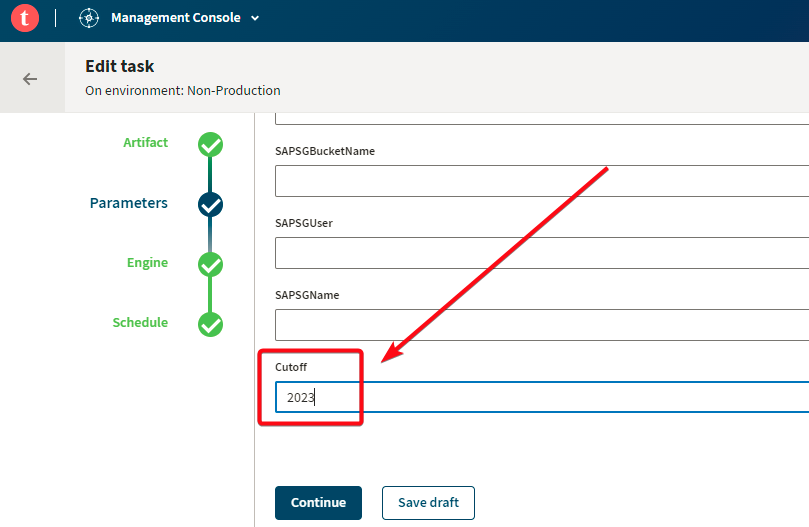
Contoh nya gini. Dalam job talend lu itu ada filter tahun, yang biasanya kita taruh langsung script didalam talend nya. Jadi kalau ada perubahan kita harus buka dulu talend studio nya. Ribet kan ya,,, apalagi kalau job talend nya udah banyak, pasti bakal berat tuu lu buka talend studio nya.
Jadi biar bisa dengan mudah merubah filter tanpa harus membuka talend studio, gua punya caranya sendiri nih. Semoga membantu ya ...
Gini-gini caranya :
1. Buka talend studio
2. Pilih job yang akan dibuat parameter
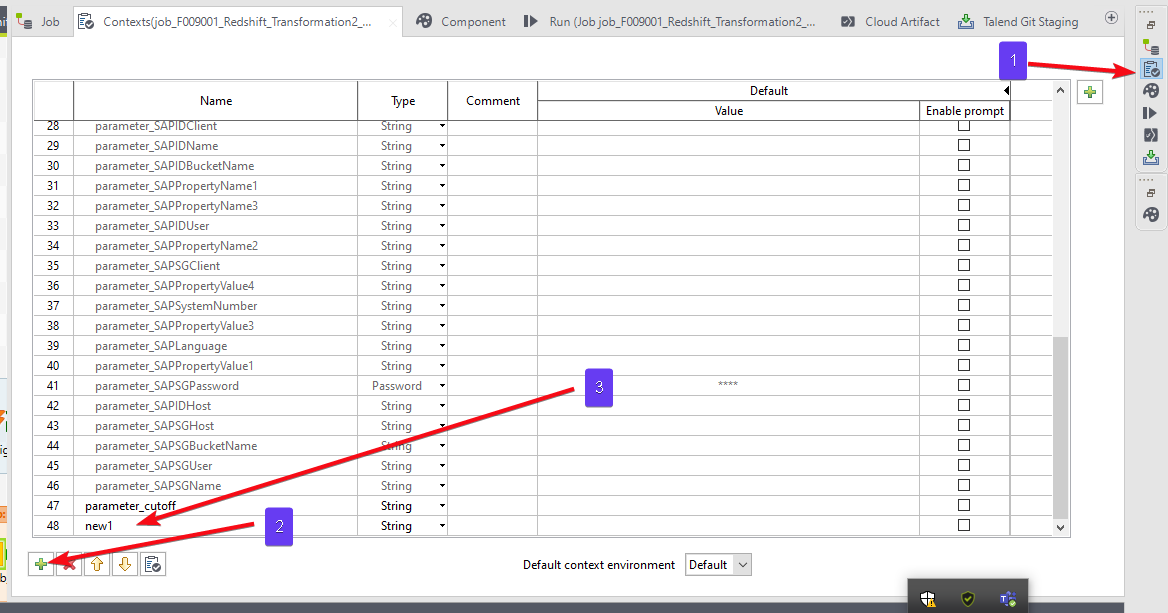
3. Kemudian ikuti gambar ini
- 1 klik contexts
- 2 klik tanda + untuk menambahkan parameter
- 3 isi nama parameter sesuai dengan kemauan yang lu mau
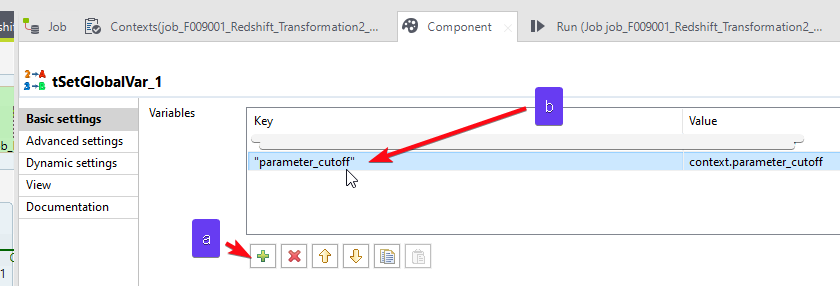
4. Naaahhh ,,, kalau udah buka component tSetGlobalVar
Jadi masalahnya itu, ketika gua lagi ngerjain project yang dari Singapura. Jadi jam nya harus disesuaikan dengan jam yang ada disana. oleh karena itu, mau gak mau gua harus nambahin logic agar jam nya sama dengan yang ada di Singapur.
Jadi begini caranya :
select DATEADD('hour',8,getdate())
Penjelasan nya :
- DateAdd = Nama fuction nya
- 'hour' = ini bagian mana yang mau di tambahkan atau dikurangi. Karena mau menyesuaikan dengan jam Singapur maka harus +8 yang awalnya kan Indonesia itu +7. Untuk negara lain tinggal menyesuaikan yah
- 8 = ini merupakan conversi negara tujuan nya. Lu bisa lihat dibawa yah buat perbandingan nya.
- getadate() = untuk mendapatkan tanggal dan jam saat ini.
Ini table conversi waktu Indonesia dengan beberapa negara di dunia.
| Waktu di Indonesia | Negara | Waktu | Selisih | Keterangan |
| 07.00 (UTC +7) | Malaysia | 08:00 (UTC +8) | +1 jam | Hari yang sama |
| 07.00 (UTC +7) | Thailand | 07.00 (UTC +7) | - | Hari yang sama |
| 07.00 (UTC +7) | Filipina | 08.00 (UTC +8) | +1 jam | Hari yang sama |
| 07.00 (UTC +7) | Brunei Darussalam | 08.00 (UTC +8) | +1 jam | Hari yang sama |
| 07.00 (UTC +7) | Singapura | 08.00 (UTC +8) | +1 jam | Hari yang sama |
| 07.00 (UTC +7) | Vietnam | 07.00 (UTC+7) | - | Hari yang sama |
| 07.00 (UTC +7) | Laos | 07.00 (UTC +7) | - | Hari yang sama |
| 07.00 (UTC +7) | Myanmar | 06.30 (UTC +6:30) | -30 menit | Hari yang sama |
| 07.00 (UTC +7) | Kamboja | 07.00 (UTC +7) | - | Hari yang sama |
| 07.00 (UTC +7) | Amerika Serikat | 19.00 (UTC -5) | -12 jam | Hari sebelumnya |
| 07.00 (UTC +7) | Korea Selatan | 09.00 (UTC +9) | +2 jam | Hari yang sama |
| 07.00 (UTC +7) | Australia (Canberra) | 11.00 (UTC +11) | +4 jam | Hari yang sama |
| 07.00 (UTC +7) | Belanda | 01.00 (UTC +1) | -6 jam | Hari yang sama |
| 07.00 (UTC +7) | Perancis | 01.00 (UTC +1) | -6 jam | Hari yang sama |
| 07.00 (UTC +7) | Italia | 01.00 (UTC +1) | -6 jam | Hari yang sama |
| 07.00 (UTC +7) | Brasil (Rio de Janeiro) | 21.00 (UTC -3) | -10 jam | Hari sebelumnya |
| 07.00 (UTC +7) | Argentina | 21.00 (UTC -3) | -10 jam | Hari sebelumnya |
| 07.00 (UTC +7) | Uni Emirat Arab (Dubai) | 04.00 (UTC +4) | -3 jam | Hari yang sama |
| 07.00 (UTC +7) | Vatikan | 01.00 (UTC +1) | -6 jam | Hari yang sama |
| 07.00 (UTC +7) | Turki (Ankara) | 03.00 (UTC +3) | -4 jam | Hari yang sama |
| 07.00 (UTC +7) | Timor Leste (Dili) | 09.00 (UTC +9) | +2 jam | Hari yang sama |
| 07.00 (UTC +7) | Spanyol (Madrid) | 01.00 (UTC +1) | -6 jam | Hari yang sama |
| 07.00 (UTC +7) | Pakistan | 05.00 (UTC +5) | -2 jam | Hari yang sama |
| 07.00 (UTC +7) | Mesir (Kairo) | 02.00 (UTC +2) | -5 jam | Hari yang sama |
| 07.00 (UTC +7) | Jerman (Berlin) | 01.00 (UTC +1) | -6 jam | Hari yang sama |
Alhamdulillah,,, currently I have new tools for learning. I'm learning Talend for ETL and Amazon Redshift for Dataware House.
For the next, I will inform you about Amazon Redshift and Talend.
So, if I have any problem and I can solve it.
I will let you know